【C++】文字列を使いこなす|C文字列とstd::stringの基本操作と注意点
この記事でわかること
この記事では、C++での 文字列の扱い方 を解説します
- C文字列(C言語的文字列)の使い方
- std::string の基本と便利な操作
- 文字列を扱う際の注意点
文字列とは
文字列とは 文字が並んだデータ のことで、C++では大きく分けて2種類あります
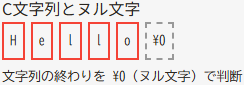
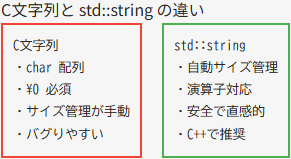
1. C文字列
char型の配列で表現\0(ヌル文字)で終端を示す- C言語から引き継いだ方法で扱いが少し面倒
2. std::string
- C++ 標準ライブラリの文字列型
- 長さを自動で管理
- 直感的で安全に扱える
C文字列の基本
C文字列は char[] とヌル文字で表現されます。初心者はバグりやすいので注意が必要です
#include <iostream>
#include <cstring>
using namespace std;

int main() {
    char str[20] = "Hello";
    cout << str << endl;

    strcat(str, " World");   // 文字列を連結
    cout << str << endl;

    cout << "length = " << strlen(str) << endl;

    return 0;
}
Hello
Hello World
length = 11strcatで文字列を連結strlenで文字列の長さを取得- 配列サイズを超えるとバッファオーバーフローになるので注意
std::string の基本操作
C++では std::string を使うのが推奨です
- 演算子やメソッドが便利
- 長さの管理が自動
#include <iostream>
#include <string>
using namespace std;

int main() {
    string s = "Hello";
    cout << s << endl;

    s += " World";           // 文字列を連結
    cout << s << endl;

    cout << "length = " << s.size() << endl     // 長さ取得
         << "substr = " << s.substr(0, 5) << endl  // 部分文字列取得
         << "find = " << s.find("World") << endl   // 検索(インデックスを返す)
         ;

    return 0;
}
Hello
Hello World
length = 11
substr = Hello
find = 6+や+=で連結可能size()で文字列長を取得substr(start, length)で部分文字列find(文字列)で検索(見つからなければstring::nposが返る)
文字列の入力方法
C++で文字列を入力する場合、std::cin と std::getline の違いに注意が必要です
#include <iostream>
#include <string>
using namespace std;

int main() {
    string name;
    cout << "名前を入力してください: ";
    getline(cin, name);   // スペースを含む入力も可能

    cout << "こんにちは, " << name << " さん!" << endl;
    return 0;
}
名前を入力してください: 山田 太郎
こんにちは, 山田 太郎 さん!cin >> nameだとスペースで区切られた最初の文字列しか読み込めない- 複数単語を扱う場合は
getlineを使用
まとめ
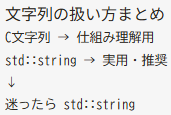
- C文字列は古い方式で、配列とヌル文字で管理する
- std::string を使うと直感的で安全、演算子やメソッドが便利
- 入力方法に注意し、
getlineを使うことでスペースを含む文字列も読み込める